Carta Collēctiōnis
Carta Collēctiōnis is a collectible-card game layered onto the operative dossier in LAPIS cohorts. Each card names a grammatical target (for example Accusative Singular or Cum Clause), and students collect Latin forms that match it from the reading they are already doing. Every submission is checked instantly against Whitaker's Words, the morphology engine behind Alpheios, so there is no grading burden on you. Collecting forms earns LP, reveals the card's art and name, and eventually upgrades a card to a foil special edition.
The deck holds 70 cards across five categories: Divinity, Location, Mythic Person, Person, and Structure. Of these, 46 are earn cards built up by submitting forms, and 24 are special cards with no collection track. Four specials are starters that every operative owns from day one (Maecenas, Arch of Titus, Pompeii, Mars); the remaining 20 are Special Unlock cards that you grant from an operative's manage page. How a student comes to deserve one is up to you and your classroom economy.
Why It Matters
The game is built on a simple idea from second-language acquisition: forms are learned when a reader notices them in meaningful input, then meets them again and again in new contexts. A card gives a student a concrete reason to scan real Latin for one feature at a time, and a reason to keep looking once they have found the first example.
Because the app requires the phrase the form came from, every capture is a form-in-context encounter rather than a decontextualized paradigm drill. A student collecting the accusative singular is not reciting an ending; they are finding puellam doing the work of a direct object inside a sentence they understood well enough to trust. Repeated captures across different sentences let the pattern build inductively, which is how durable grammatical intuition actually forms.
The game also personalizes attention. The grammatical target on a card is fixed, but the content a student meets it in is theirs to choose. A student drawn to mythology will hunt the accusative through the Hercules and Troy material; one who loves the city will hunt it through Pompeii and the Forum. Both practice the same grammar, each through the reading that holds their interest, which is exactly the condition under which students read enough to internalize a form.
The parse-it-yourself verb cards push one step further, past recognition into a produced parse. Naming a form's person and number is where passive familiarity starts to become active knowledge.
How to frame it for students
Treat card collecting as sustained, low-stakes extensive reading, not a quiz. Point a student at a text and a card, and let them hunt. The reveal-and-foil loop rewards persistence, which is the behavior that turns a form a student can spot into a form a student owns.
Enabling Collections (Do This First)
Collections are hidden by default
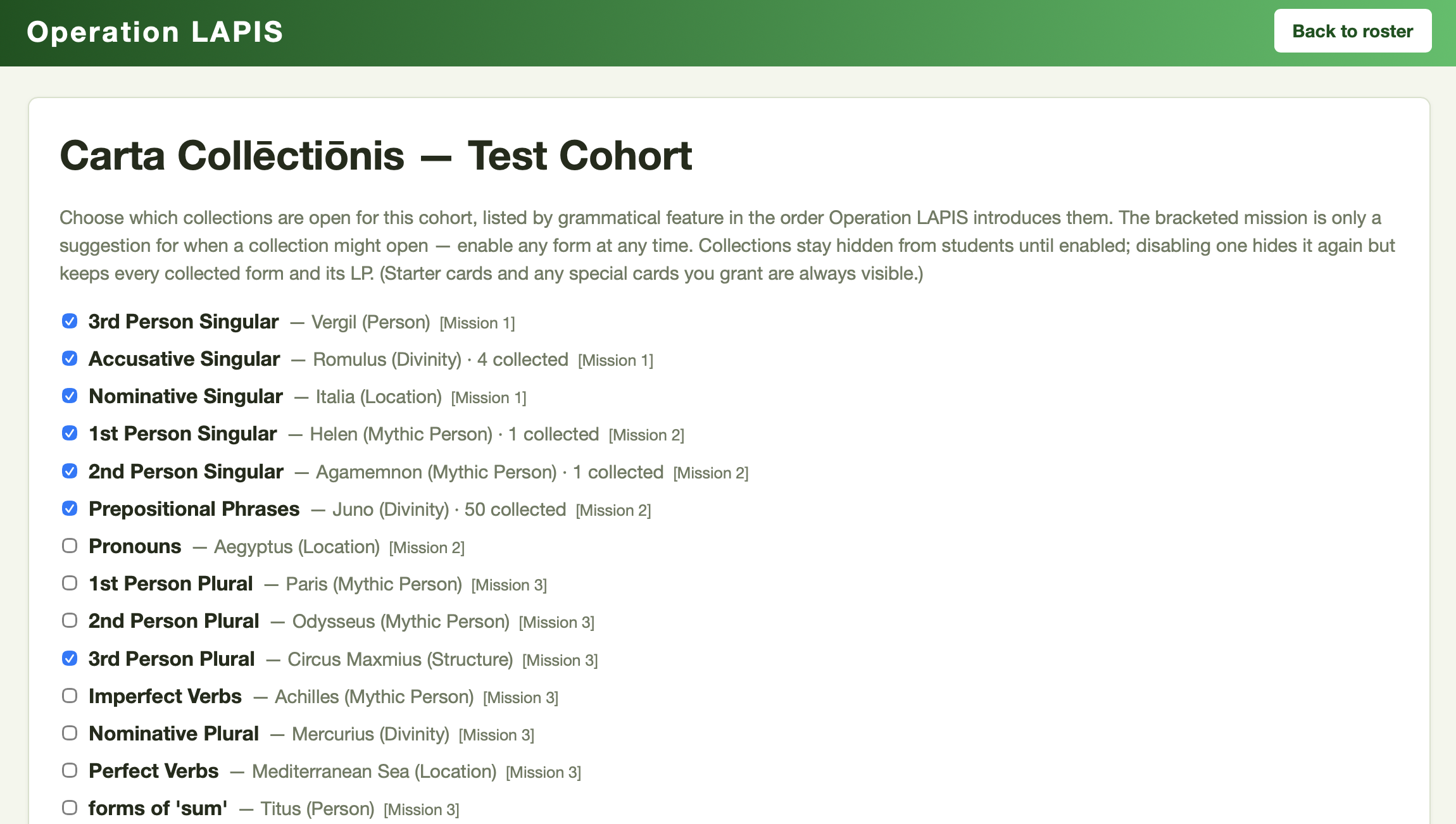
Students see no Carta tab and no cards until you enable card collections for the cohort. A brand-new LAPIS cohort opens with three collections already on (Nominative Singular, Accusative Singular, and 3rd Person Singular verbs). A cohort created before this feature launched opens with zero. If your students cannot see the Carta tab, this is almost always why.
To enable collections:
- Open the cohort's Operatives view.
- Click Enable · Card Collections, on the Carta row of buttons below Bulk-award and Bulk-mark (Review · Collected Entries sits beside it).
- Tick the collections you want open, then save.
The list is flat, ordered by when each grammatical feature first appears formally in the LAPIS grammar scope, with a bracketed [Mission N] tag on each row. That tag is only a suggestion for when a collection might reasonably open; you can enable any card at any time. The page also shows how many forms the cohort has already collected per card, so you can see which collections are active before turning one off.
Disabling is safe
Turning a collection off hides it from students again but keeps every collected form and all its LP. Turn it back on and everything is still there.
How Students Collect
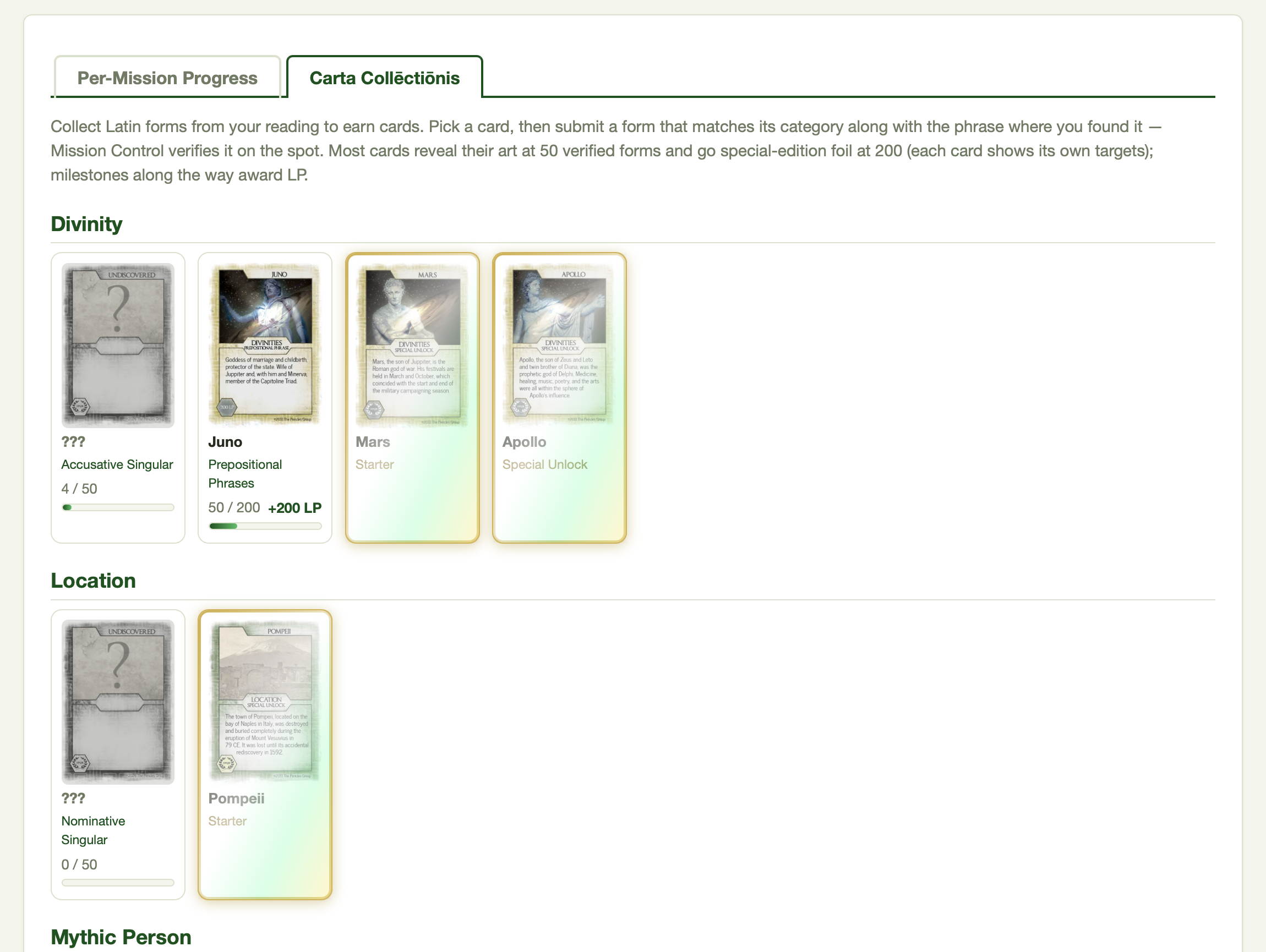
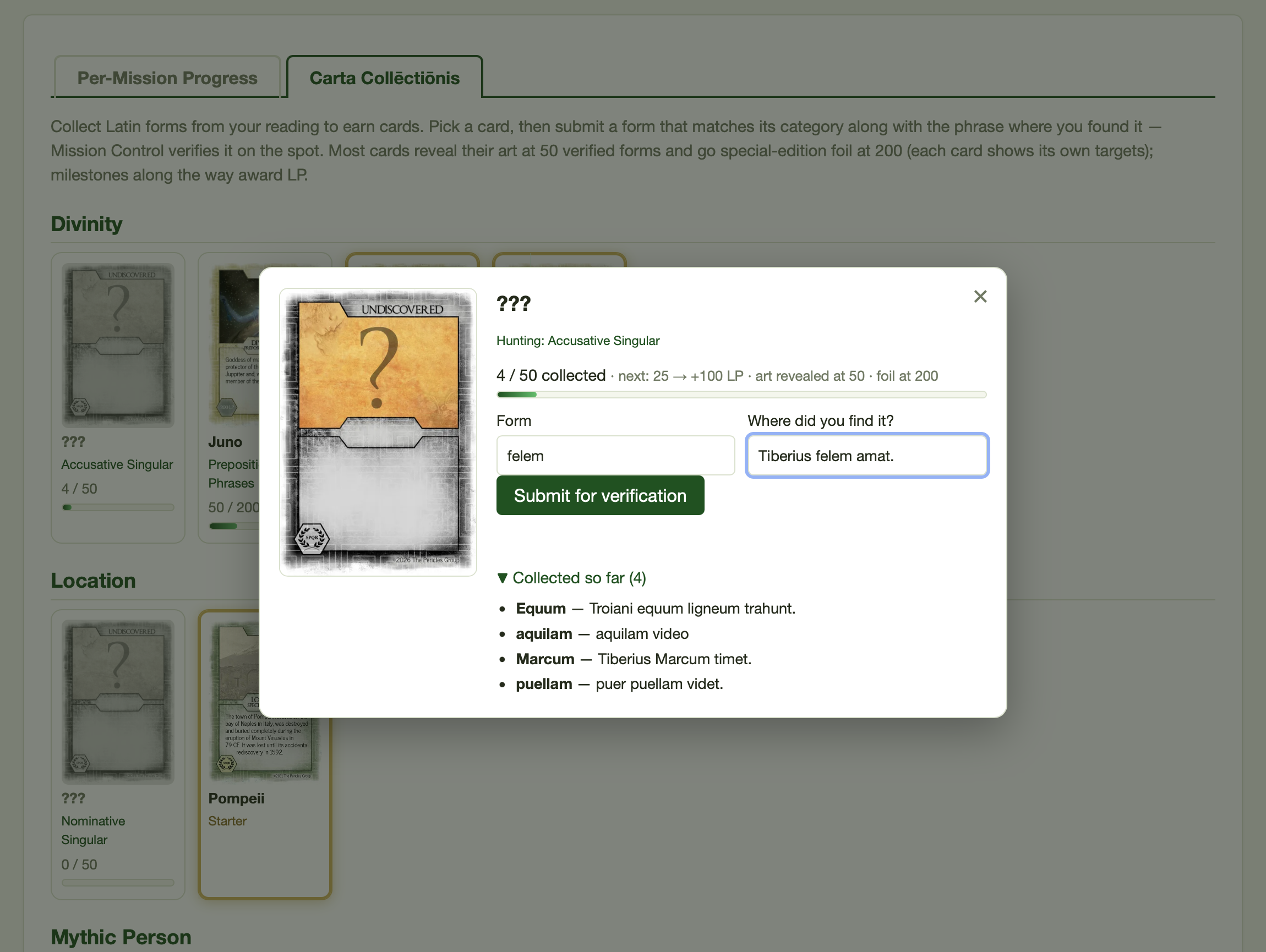
On the Carta Collēctiōnis tab of their dossier, a student clicks a card and submits a form that matches its target, along with the phrase or sentence where they found it. The phrase must actually contain the form. The app parses the submission through Whitaker's Words and answers on the spot: a match is stored and counted; a non-match returns a "keep hunting" message, deliberately without revealing the form's other readings, since discovering that puellae is also dative is part of the game.
There are three kinds of card:
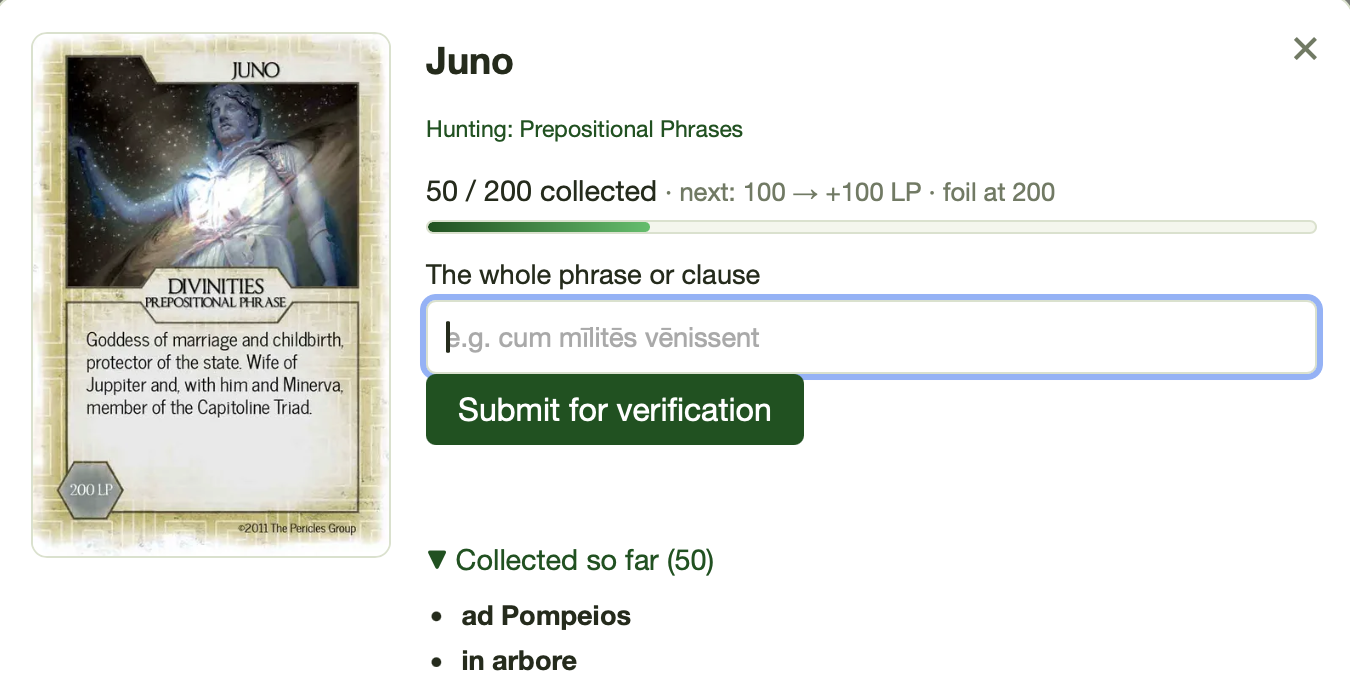
- Construction cards (9 of them, such as cum clause, purpose clause, ablative absolute, and indirect statement) take a whole phrase rather than a single word. Every word is parsed and the construction's surface signals are checked. The rules are deliberately generous; your Remove control is the backstop for false positives. The exception is Prepositional Phrases, which must be just the phrase (in vīllā, cum multīs servīs, ad vīllam Sextī, magnā cum cūrā), not the sentence around it. A pasted sentence is turned back with a note naming the word that does not belong, such as a verb.
- Parse-it-yourself verb cards (11 of them, such as Perfect Verbs, Future Verbs, the subjunctive tenses, and forms of sum) also require the student to identify the form's person and number. Their parse has to agree with a Whitaker reading of the form.
- Locked cards keep their identity secret. Until unlocked, a card shows a face-down back and a
???name; only the grammar target, that is, what to hunt for, is visible. The reveal is the payoff.
Several anti-gaming guardrails run automatically: duplicate forms are rejected per card (macrons, capitalization, and i/j or u/v spelling do not create a "new" form); most cards accept at most 3 forms built on the same lemma; and each operative may make at most 20 submission attempts per minute, accepted or rejected alike, so guess-spamming a card costs the student their own budget.
Misspellings are caught, and named
Whitaker's Words, faced with a word it does not know, will try guessing that the word is two words run together — which used to let a typo like de abrore verify on the back of a real reading of rōre. The app now discards those hedged guesses (real enclitics like puellamque → puella + que still parse), which also closes the door on English words that happened to split into Latin pieces, such as observe and action. When a construction card's phrase fails because of one of these, the message names the word Whitaker did not recognize rather than saying "keep hunting" — that is usually the misspelling, and it points the student straight at it.
The source phrase is checked too
A form that could match a card is still turned back when its own source phrase rules that reading out, and the message says why. Viā cited from in viā is not a nominative, because it follows a preposition that takes the ablative. Diēs cited from clāra diēs est is not plural, because every verb in the phrase is singular. Cubiculum cited from cubiculum est parvum is not accusative, because sum takes no direct object. These checks fire only on clear evidence; a subtler slip, such as an object vīnum collected as a nominative, still needs your review. Tested against every form students had collected when it launched, the check caught only genuine mistakes.
Proper names
Whitaker's dictionary lacks most of the names in the LAPIS stories (Octāviāna, Caecilius, Maecēnās, Lāomedōn), or knows them only as other words, so Mission Control carries its own list of names drawn from the RPG, CYOP, fabulae, and informational texts. A name counts only when it is capitalized, typed that way or capitalized in the pasted phrase; that keeps Secundus the character from letting secundus the adjective onto a noun card. A student who types a name in lowercase is told to capitalize it. A name the list does not have yet is rejected as unrecognized; send it to lapis@practomime.com to be added.
Progression and LP
For a standard earn card, the number of verified forms drives everything:
| Forms collected | What happens |
|---|---|
| 25 | +100 LP |
| 50 | +100 LP and the card unlocks: art and name revealed |
| 100 | +100 LP |
| 150 | +50 LP |
| 200 | +50 LP and the card goes foil |
That is a maximum of 400 LP per card. Two small-inventory cards, Demonstrative Adjectives and Pronouns, run a compressed track instead, because there are only so many forms of hic and ille: milestones at 10, 20, and 40 forms (100, 100, and 200 LP), unlock at 20, foil at 40, and no per-lemma cap. Each card shows its own thresholds on its progress bar.
Carta LP counts toward the operative's total LP and level math, and appears as its own Carta Collēctiōnis line in the dossier's LP Breakdown.
Managing Cards on the Operative Manage Page
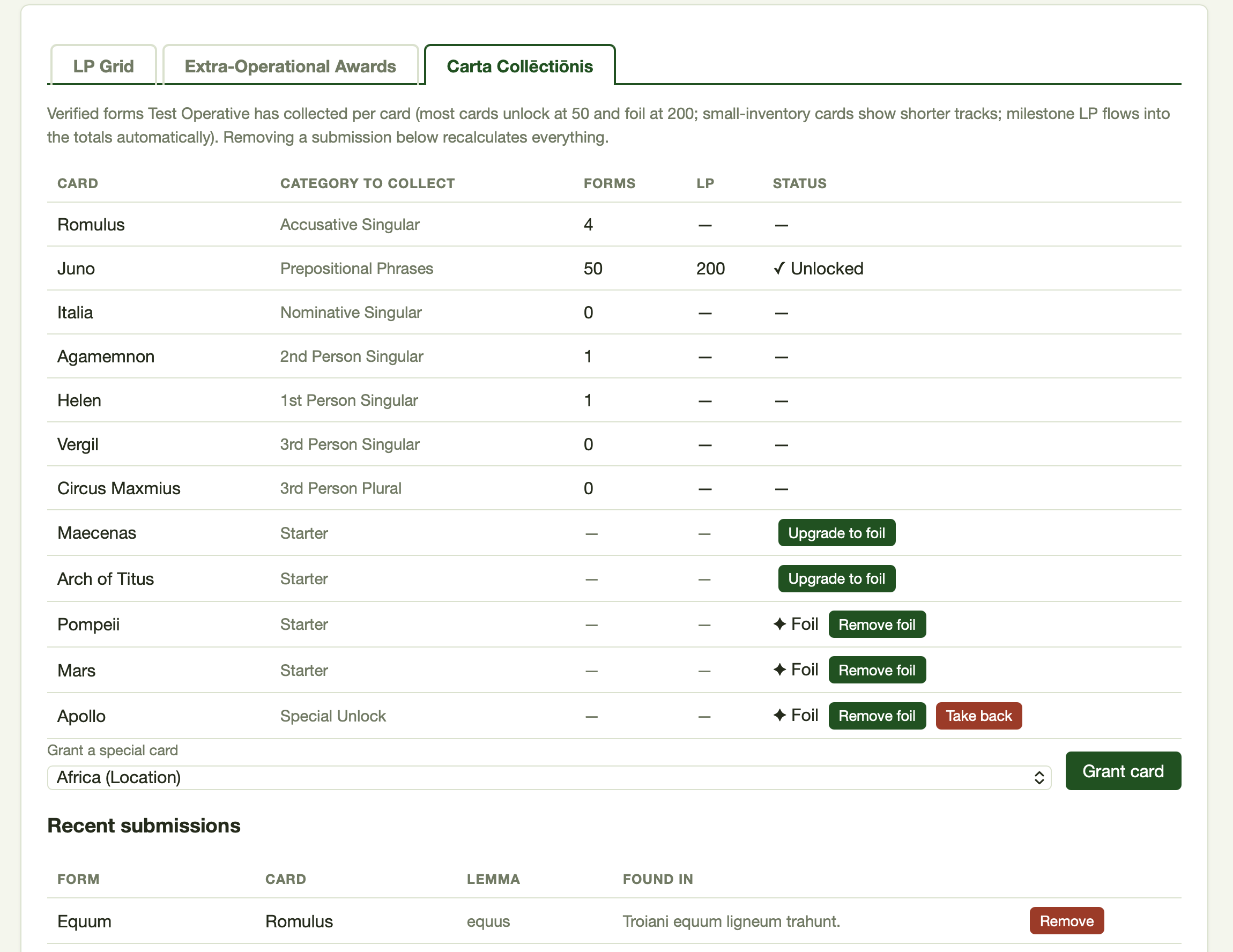
The Carta Collēctiōnis tab on any operative's manage page gives you:
- Per-card progress table: every enabled card with its form count, LP, and unlock or foil state, plus the operative's owned special cards.
- Grant a special card: pick from the dropdown of ungranted Special Unlock cards and click Grant card. Undo with Take back on the card's row.
- Foil a special: starters and granted specials can be upgraded to foil, and downgraded again, at your discretion. Specials have no collection track, so foil there is purely an honor you bestow.
- Recent submissions with Flag and Remove: the operative's 50 latest collected forms, each with its source phrase, a Flag control, and a Remove control. Both act in place, without reloading the page. Because counts, LP, and unlock and foil state are all derived from the stored forms, removing a bogus submission self-corrects everything, with no cleanup math on your part. Flagging instead asks the student to fix the citation themselves — see Fixing Citations below. Rows a student has edited carry a small italic edited; a flag they have answered turns the row green with a corrected badge.
Remove has Undo instead of a confirmation prompt
Clicking Remove dims and strikes through the row and turns its button into Undo for a few seconds; only then is the form actually removed and the counts updated. Working down a long list, you can remove several rows in a row, each with its own Undo. Leaving the page during the countdown still completes the removal.
Spot-checking honesty
Each stored form carries the phrase the student said it came from. Skim the recent-submissions list occasionally. If a source looks invented, Remove the form and have a word; if it is merely mistyped, Flag it and let the student repair it. To do this across a whole cohort rather than one operative at a time, use the cohort-wide review page.
Fixing Citations: Student Edit, Agent Flag
A form can be perfectly verified and still carry a bad citation — a source phrase pasted with a typo, a form entered without its macrons. That used to be write-once, so the only remedy was for you to remove the entry, which took its LP with it. Two controls now handle it without touching anyone's score.
Students can fix their own typos. In the "Collected so far" list inside a card, each entry has an Edit button that opens the row for inline correction of the form and its source phrase. Only cosmetic edits pass: the new spelling has to normalize to the same word (and a construction card's phrase to the same sequence of words), so the stored parse still describes the row and nothing needs re-verifying. A genuinely different word is refused, with a nudge to go collect it fresh — which keeps every stored form one that actually went through Whitaker.
You can flag an entry for the student to fix. Beside Remove in the submissions table (both on the manage page and on the cohort review page) there is a yellow Flag. Flagging highlights the entry in amber on the student's own card, with a note asking them to check the citation, and adds an amber ring and a ⚑ n to fix badge to that collection's gallery tile so the flag can be found among seventy cards. Counts, LP, and unlock or foil state are untouched — a flag is a note, not a penalty. Unflag takes it back.
The loop closes itself: when the student edits a flagged entry the flag clears, and the entry turns green with a corrected badge in your view, so you can see at a glance which of your flags have been answered. Green rows revert to plain once you log a later review (below).
Flag rather than Remove
Reach for Remove when a submission is bogus — an invented source, a form that should never have counted. Reach for Flag when the form is real but the citation is sloppy: it turns your spot-check into the student's revision work instead of a silent deduction.
Reviewing Collected Entries Cohort-Wide
Reading citations one operative at a time does not scale past a few students, so the roster now has a second row of Carta buttons: Enable · Card Collections and, beside it, Review · Collected Entries. The review page puts every form the cohort has collected on one screen.
- Scope: the whole cohort, or one operative.
- Sort: newest or oldest first, by operative, by grammatical form (in curriculum order), by card, by lemma, or flagged-first.
- Filter: by grammatical form — the form being collected, 3rd Person Singular, Dative Plural, not the card's thematic category — listing the collections this cohort has enabled; by Collected date (today, last 7 days, last 30 days); Flagged only; and Since last review.
- Act: the same Flag / Unflag and Remove controls as the manage page. They work in place, so the page neither reloads nor jumps back to the top, and the entry and flagged counts in the header update as you go. Each row shows the form, what it was collected for, the card, the lemma, and the source phrase, with the operative's name linking to their manage page.
The header reports the entry count and how many are flagged. Very large views are capped at the first 500 entries, with a prompt to narrow the filters.
The "Log review" checkpoint
The Log review button stamps a per-cohort review timestamp: this is how far I have read. It gives you two things — the Since last review filter, which narrows the table to entries collected or corrected after that moment, and the green corrected rows, which show only the flags answered since your last checkpoint and go plain once you log a new one. Working the page as filter to what's new → skim citations → flag what's off → Log review** turns a growing pile of submissions into a bounded weekly task.
A realistic cadence
Once a week, open Review · Collected Entries for the cohort, tick Since last review, sort Flagged first, and read down the Found in column. Flag the citations that look invented or garbled, then click Log review. Next week's view starts where you stopped.
Questions or bugs: lapis@practomime.com. Include your cohort name and an operative code if relevant.