Speculum: Debriefs & Reflection
Speculum (Latin for "mirror") is the part of Mission Control where operatives look at themselves as learners. LP tell a student how much they earned; Speculum asks how they earned it: how they read, whether they went to the CODEX, what risks they took in Latin, whether they thought like a Roman, and how they worked with their team. It has two parts, a short mission debrief after each mission and a longer Speculum reflection once a marking period, and it runs in LAPIS, CYOP and FALX cohorts alike.
Both parts stay off until you open them, so nothing appears on a student's dossier before you are ready. The controls sit in the Speculum row of the cohort's Operatives page. While a debrief or reflection is running, an Open now link beneath the row takes you straight to it and shows how many operatives have submitted, so you can check on it without hunting through the Mission Debriefs page.

Mission Debriefs
Opening a debrief
When a mission ends, click Open · Mission Debriefs, choose the mission, and open it for the whole cohort or for one section. In FALX cohorts you open one debrief per episode instead. The debrief appears on each operative's dossier at once and takes three to five minutes, short enough to run at the end of a period while the mission is still fresh.
What the operative answers
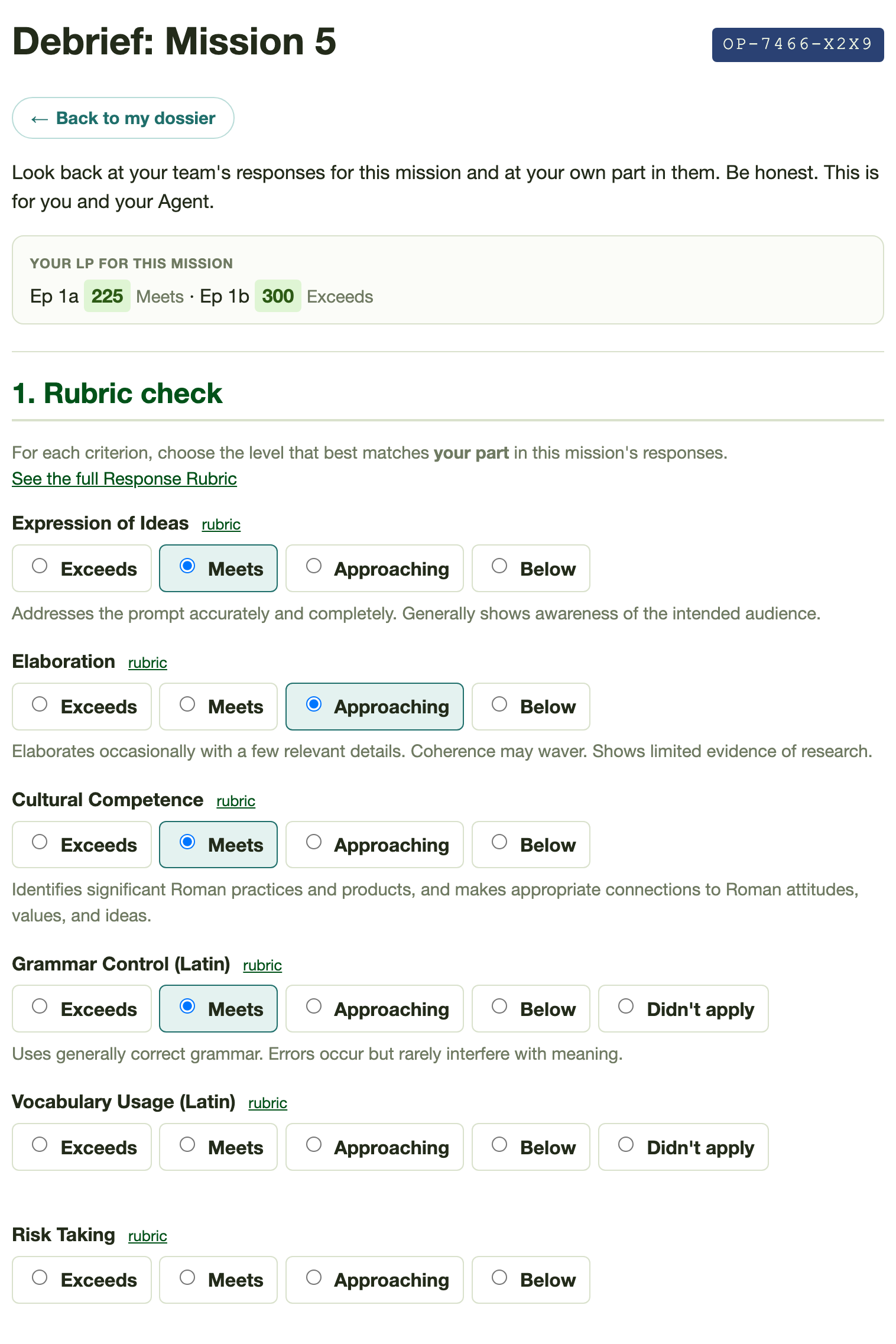
The debrief opens with a reminder of the operative's LP for the mission, episode by episode with the rubric level each score stands for, or a note that you have not scored it yet. Students look back on the mission with your scores in view, so a self-rating above or below them is a claim they chose to make.
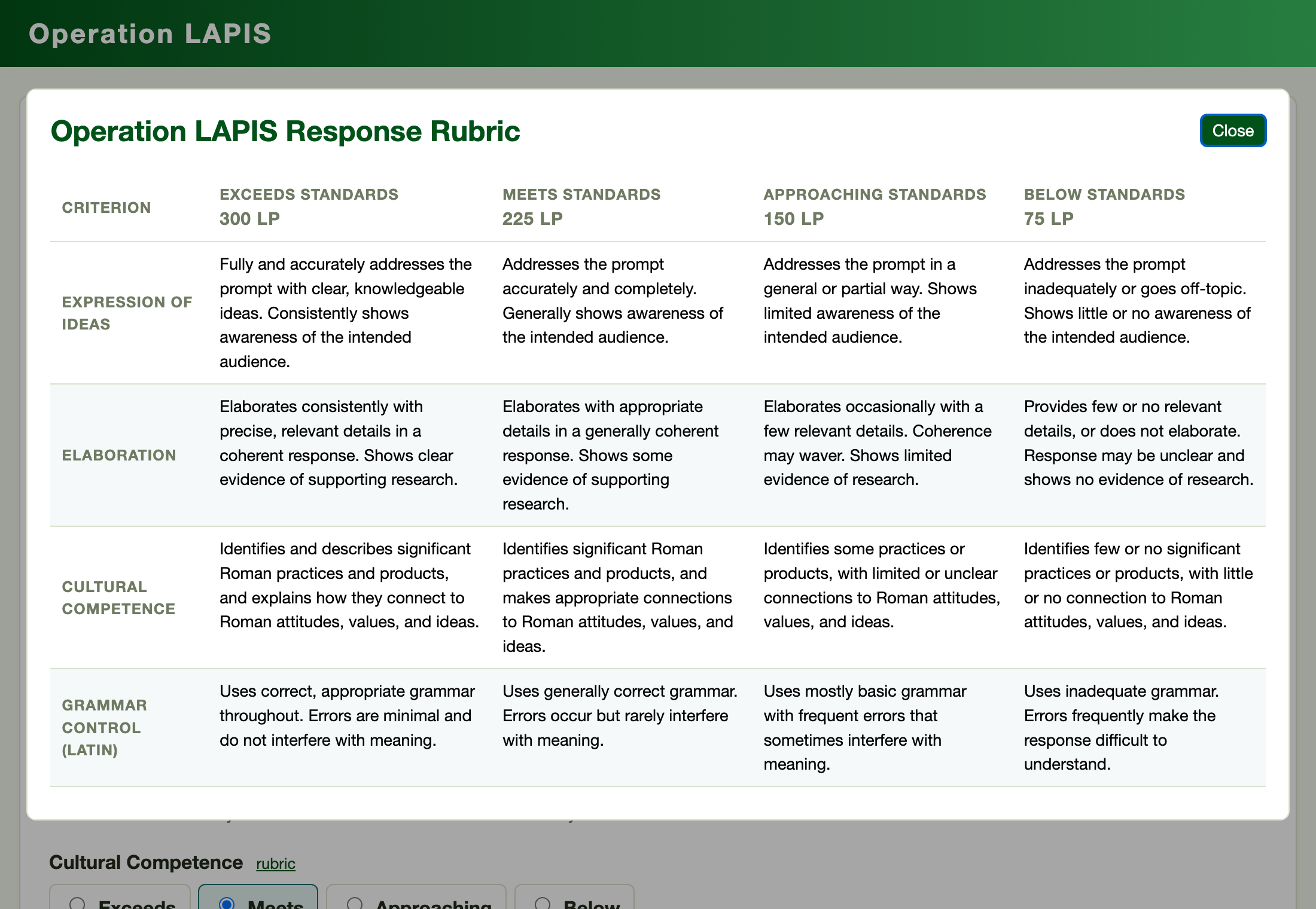
The first step is a rubric check: the operative rates their own part in the mission's responses against the six criteria of the Response Rubric, on the rubric's four levels. Picking a level shows its descriptor beneath the row, and the full rubric opens as a pop-up from any criterion, so students rate themselves in the same language you grade with. Grammar Control and Vocabulary Usage also offer Didn't apply, for English RPG cohorts, whose teams compose in English. The debrief asks about the student's own part rather than the team's post because that is how you award immersion LP: per operative, on individual contribution.
The second step, What I contributed, is a checklist: proposed ideas, drafted Latin, looked things up in the CODEX, checked the grammar or vocabulary before posting, served as lead operative and posted the response, helped a teammate with the Latin or the story, kept the team organized. One required line names their biggest contribution. The third step, Our team, rates how well the team worked together on four levels and asks for one thing to do differently next mission. The last step is optional: a risk they took in Latin, and something Roman that shaped what their character did.
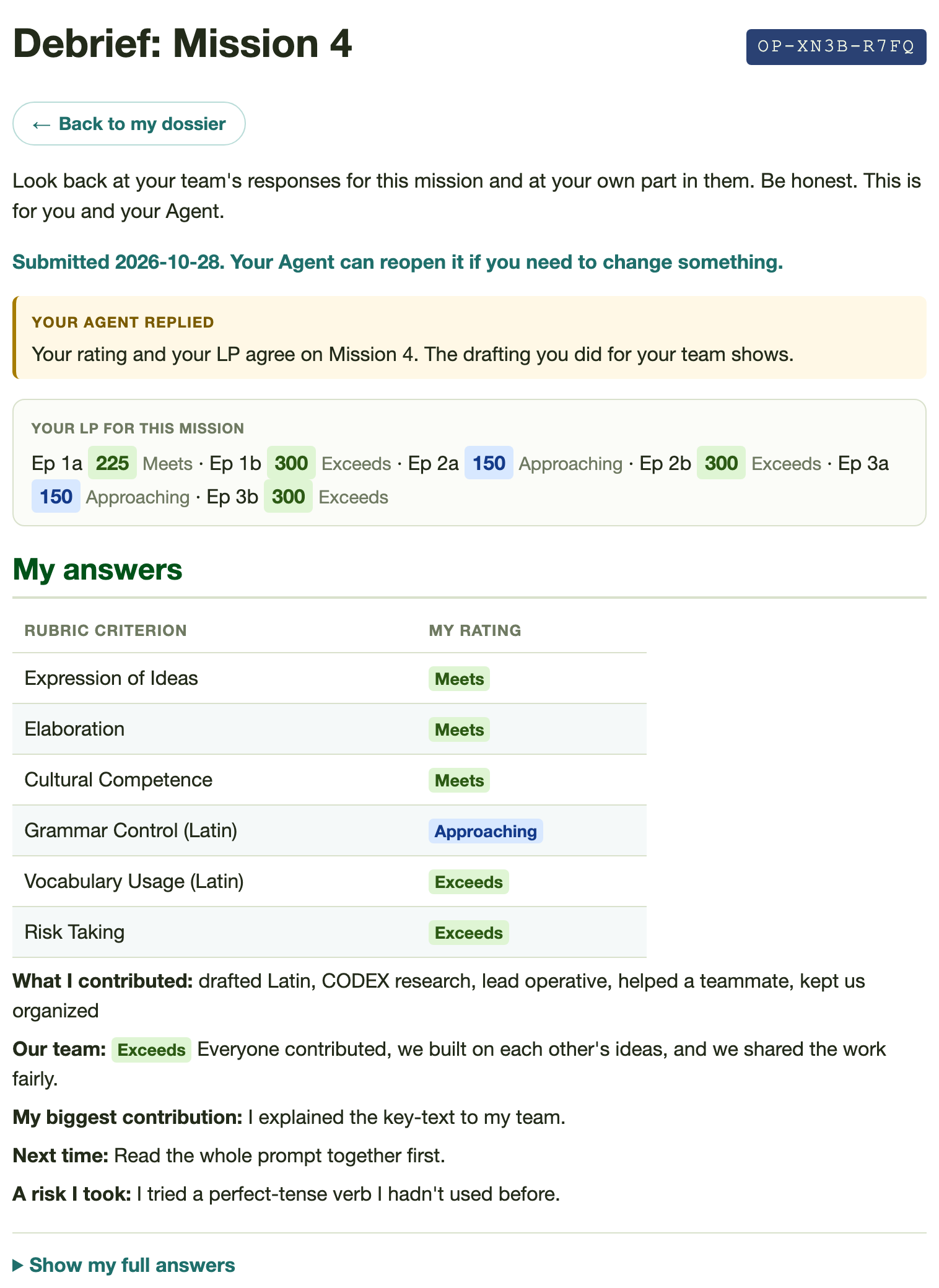
Once submitted, the debrief opens as a short My answers summary: their ratings in a table, what they contributed, the team rating and their notes, with your reply above it and the full form folded away under Show my full answers. A student rereads what they said in a few seconds instead of scrolling back through the whole form.
The debrief dashboard
Open a debrief from the Mission Debriefs page to read it. Answers are grouped by team, with each member's self-ratings, contribution checklist and team rating side by side and the LP you have entered for that mission in the last column. Each team's header line reports how many members have submitted, whether every member contributed, and who says they posted as lead operative.
That layout serves two calls you already make. Immersion LP go to individual contribution, not equal share, and three teammates' claims read side by side show quickly who carried a response. The suggested Puncta Virtūtis award, 3 PV when every member contributes and +2 when the lead operative posts, reads straight off the header line. Contribution claims are visible only to you; teammates never see one another's answers.
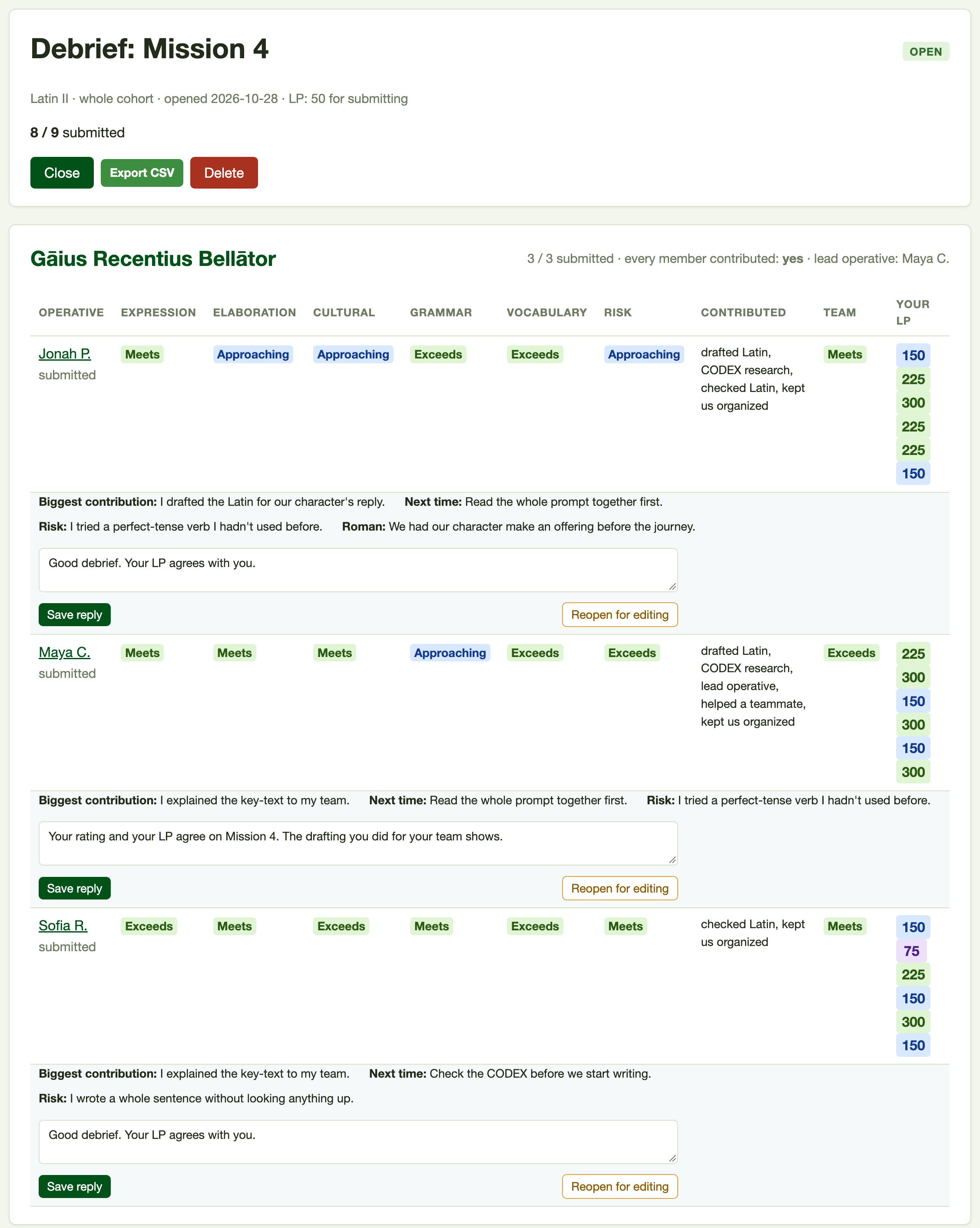
Under each submitted debrief sits a reply box with Save reply, and your reply appears on the operative's dossier. At the right of the same row, in amber, Reopen for editing puts the debrief back on their dossier so they can change it; it stands apart from Save because it undoes a submission. Once you enter a mission's LP, the student sees their own level (the average of their ratings) beside your LP band, with 300, 225, 150 and 75 reading as Exceeds, Meets, Approaching and Below. A student who rated themselves Exceeds and earned Approaching sees the gap without your having to point it out.
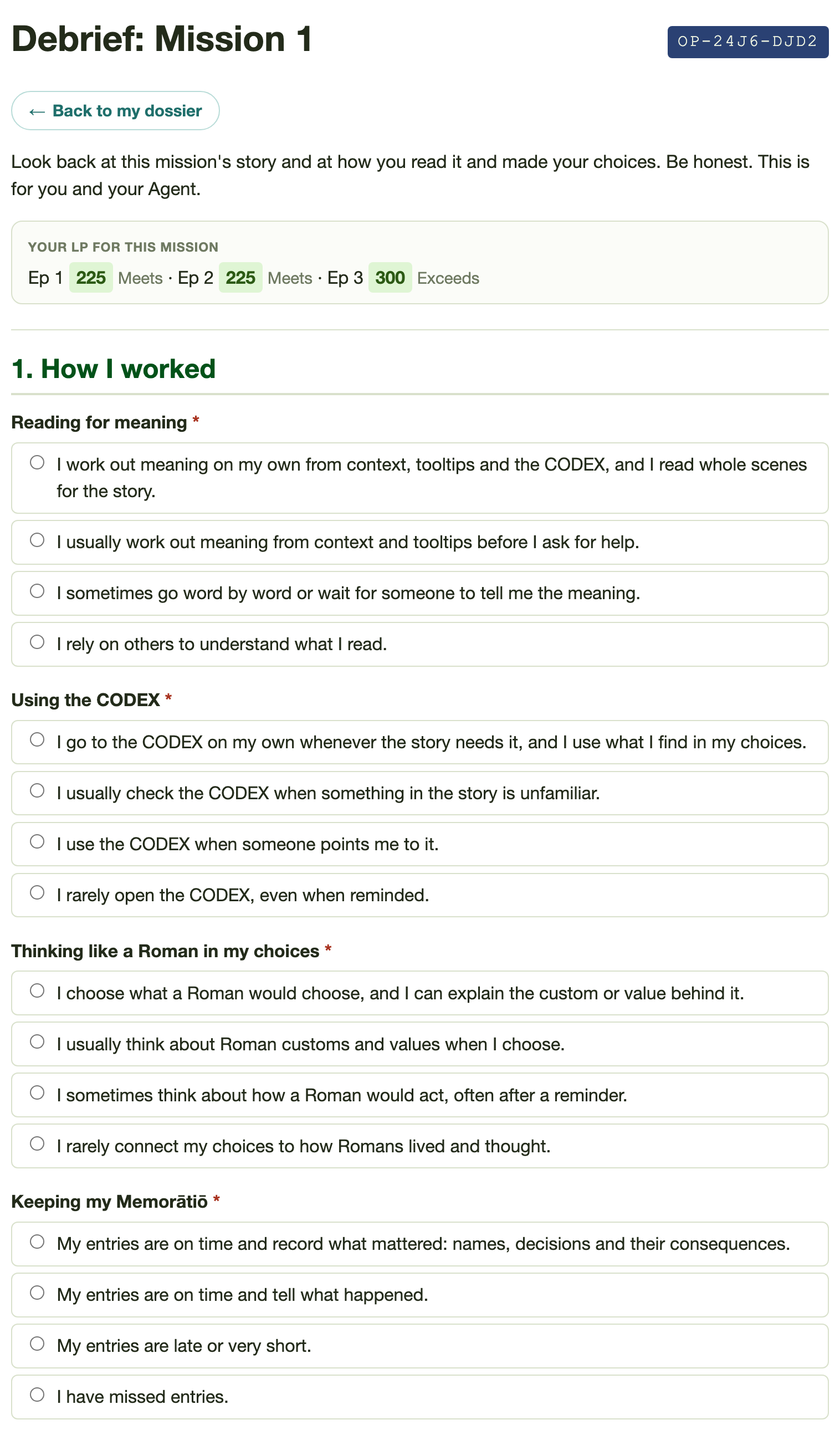
CYOP cohorts
CYOP cohorts get a debrief built for solo reading and choosing. In place of the rubric check, the operative rates four ways they worked: reading for meaning, using the CODEX, thinking like a Roman in their choices, and keeping their Memorātiō. A checklist covers what they did (read every scene before choosing, used tooltips and context, looked something up in the CODEX, explained a choice by Roman values, shared or built on an idea in discussion, wrote their Memorātiō entry), and a four-level rating covers their part in class discussion. Two optional lines ask for something Roman that shaped their choices and something in the Latin they worked out on their own. With no teams, the dashboard groups answers by section.
The Speculum Reflection
Once a marking period, click Deploy · Speculum Reflection, give it a name such as "Quarter 2", and add up to five prompts of your own if you want them. It takes about fifteen minutes and works best after several debriefs, because it reads them back to the student. It has six steps:
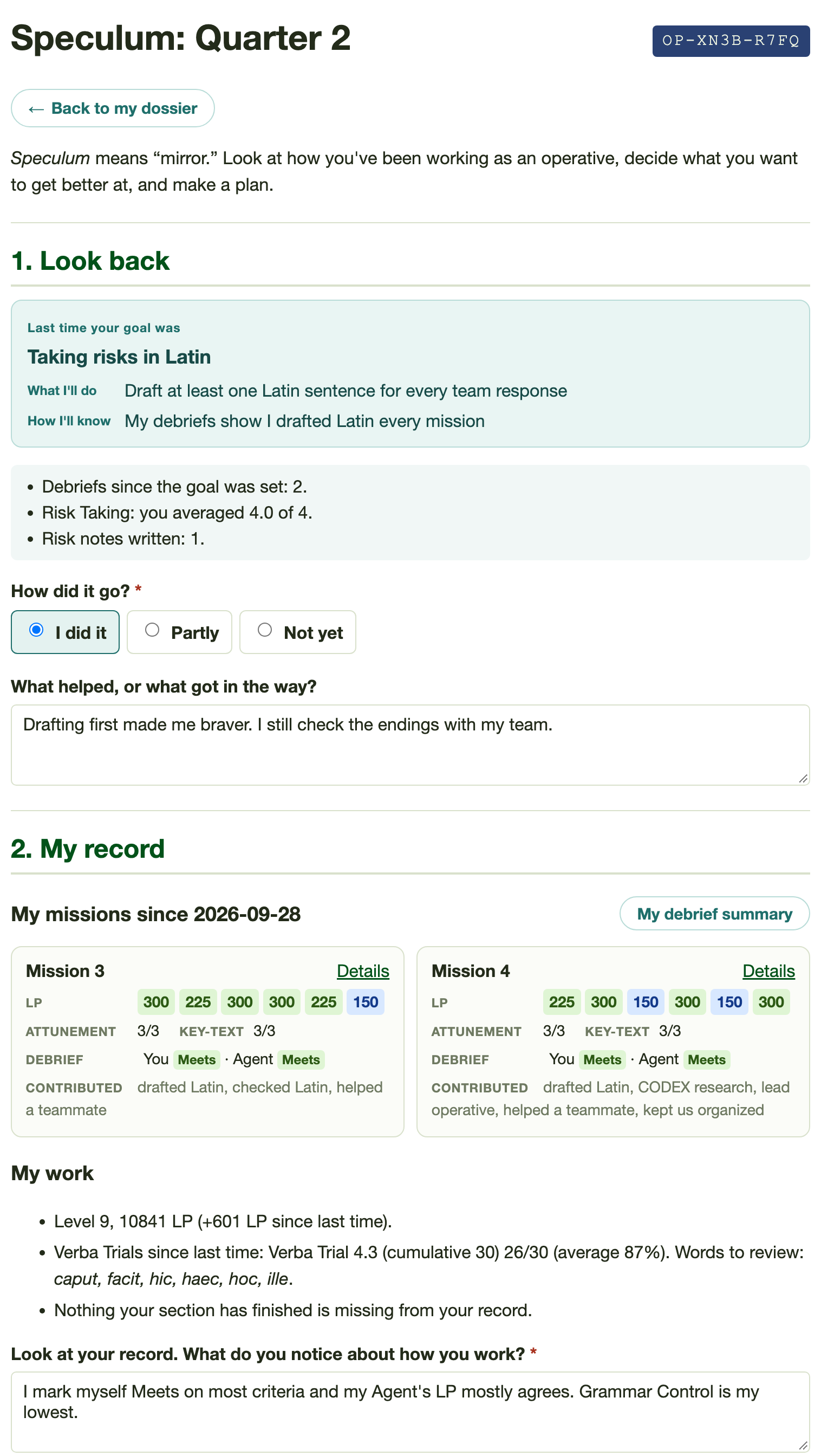
- Look back. From the second reflection on, the operative sees last period's goal with its evidence and says whether they did it (I did it, Partly, Not yet), with a line on what helped or got in the way.
- My record. A read-only summary of the period: a card for each mission they debriefed, then their LP and level gained, Verba Trial scores with words to review, and anything that may be missing. They write what they notice.
- Operative habits. Seven habits rated on the rubric's four levels: reading for meaning, researching in the CODEX, contributing to my team, communicating with my team, taking risks in Latin, thinking like a Roman, and keeping up my own record.
- Growth. A one-to-five sense of whether they read Latin better than at the start of the period, then up to two strengths and two areas that need work.
- Shout-out (optional). A teammate or classmate who helped, and how. Only you see it.
- One goal for next period, described below.
The record flags work as "may be missing" when most of the operative's section has an entry for an episode or attunement and they have none. LP entries carry no dates and grading can lag, so the app never says "missing" outright; a student who believes the work is done checks with you. In CYOP cohorts the two team habits become one, discussing with classmates, so there are six.
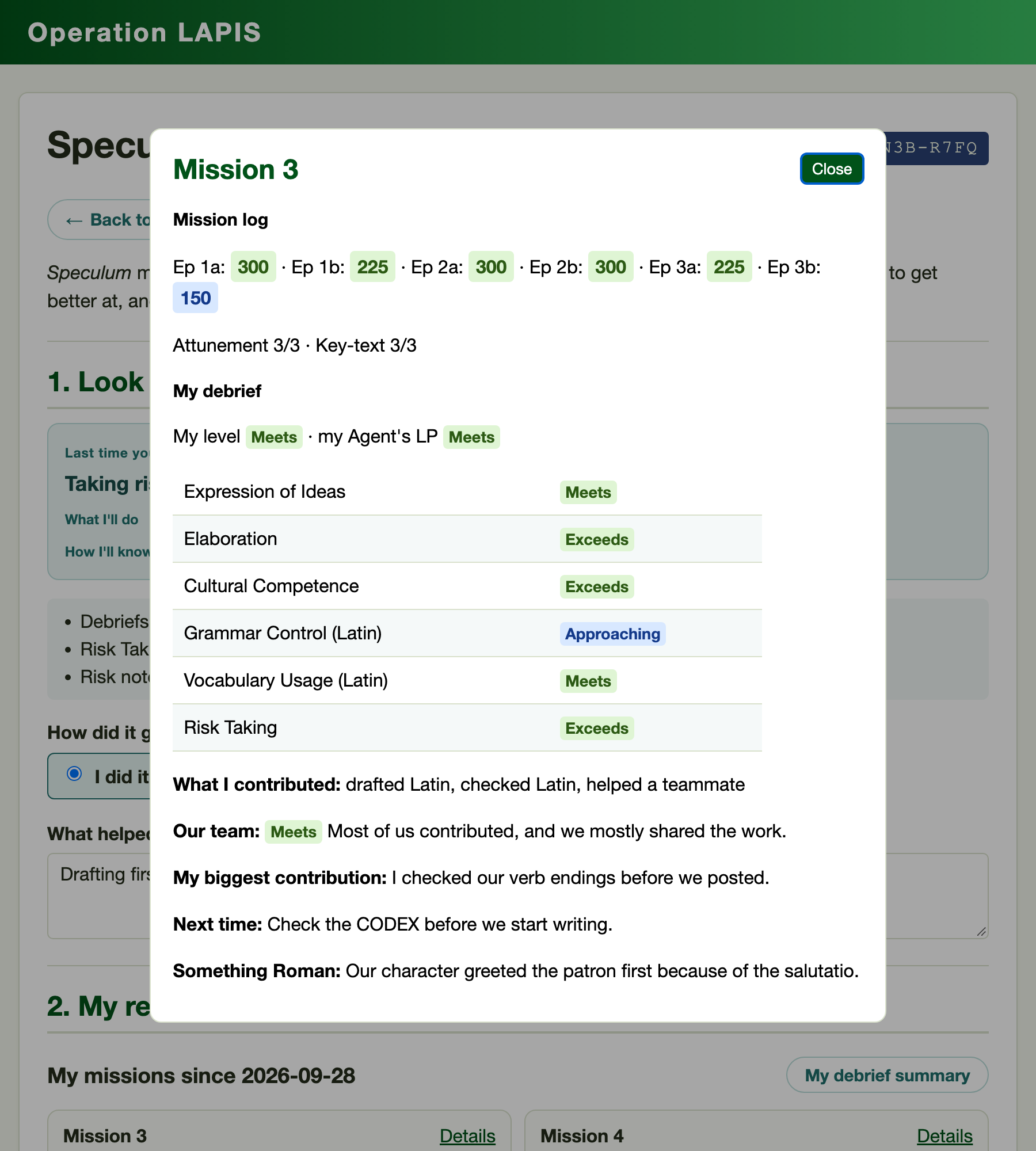
Each mission card in the record puts the mission's log beside the debrief: the LP for every episode you have scored, attunement and key-text counts, the operative's own level beside your LP band, and what they contributed. Details on a card opens the full debrief in a pop-up, with their rubric ratings, notes and your reply, and My debrief summary opens their average on each criterion, a tally of their contributions, and how often their level matched your LP. The student reads the period mission by mission, the way they lived it, before being asked what they notice.
Goals and how they are checked
The goal step offers two kinds of goal from one menu. A habit goal names one of the habits (the student's lowest-rated habit from last time is flagged) and asks for one specific action and how they and you will know they did it. A work goal is measurable: raise the Verba Trial average to a target, leave no episodes missing, or complete every attunement, each shown with its current figure.
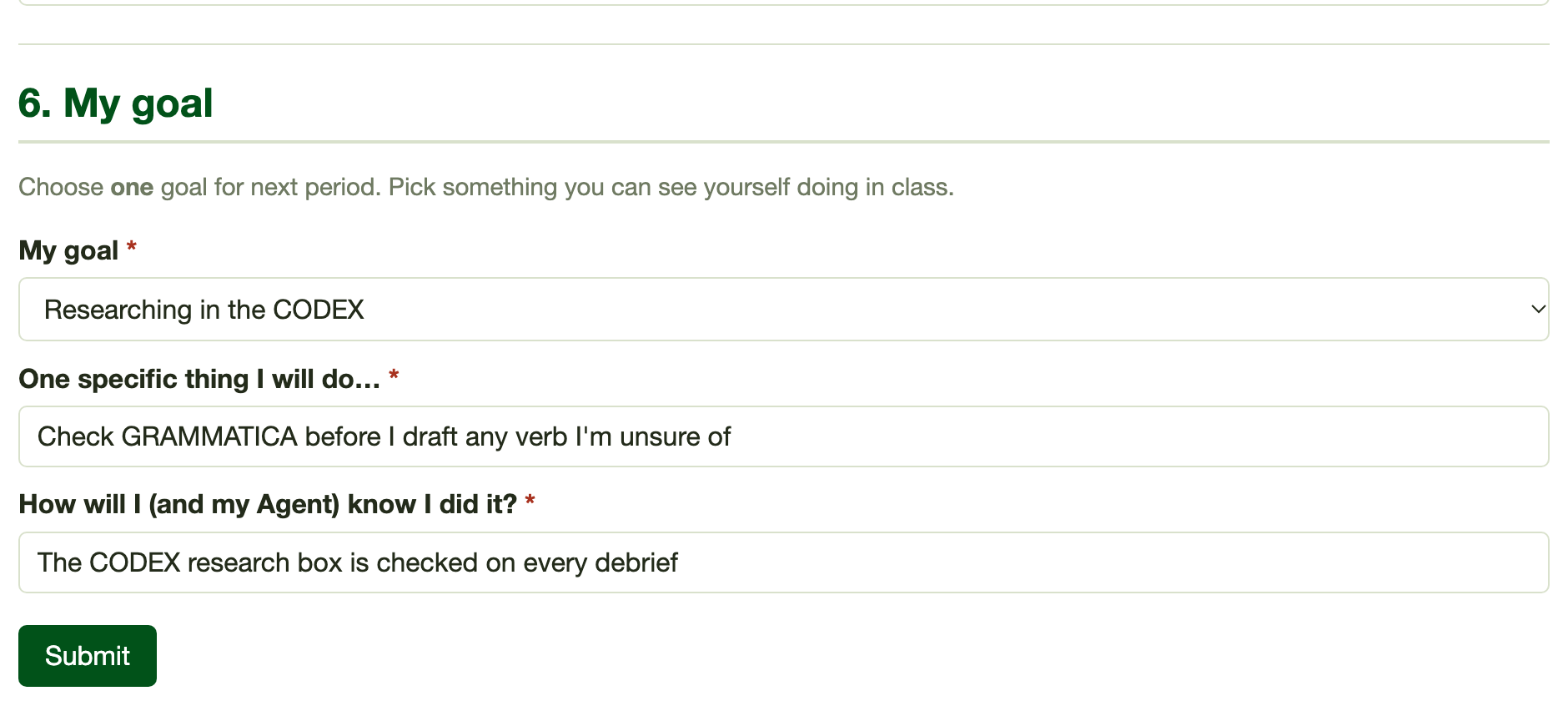
The goal stays pinned to the operative's dossier until the next reflection, which checks it. Work goals are measured automatically against the figure at the time the goal was set: met, partly, not yet, or no data. Habit goals are checked against the debriefs in between, so a goal about contributing is read against the contribution tally, a goal about taking risks against Risk Taking ratings and risk notes, and a goal about researching against CODEX research checks and Elaboration ratings. The student gives their own answer as well, and you may mark the outcome yourself; your mark always wins.
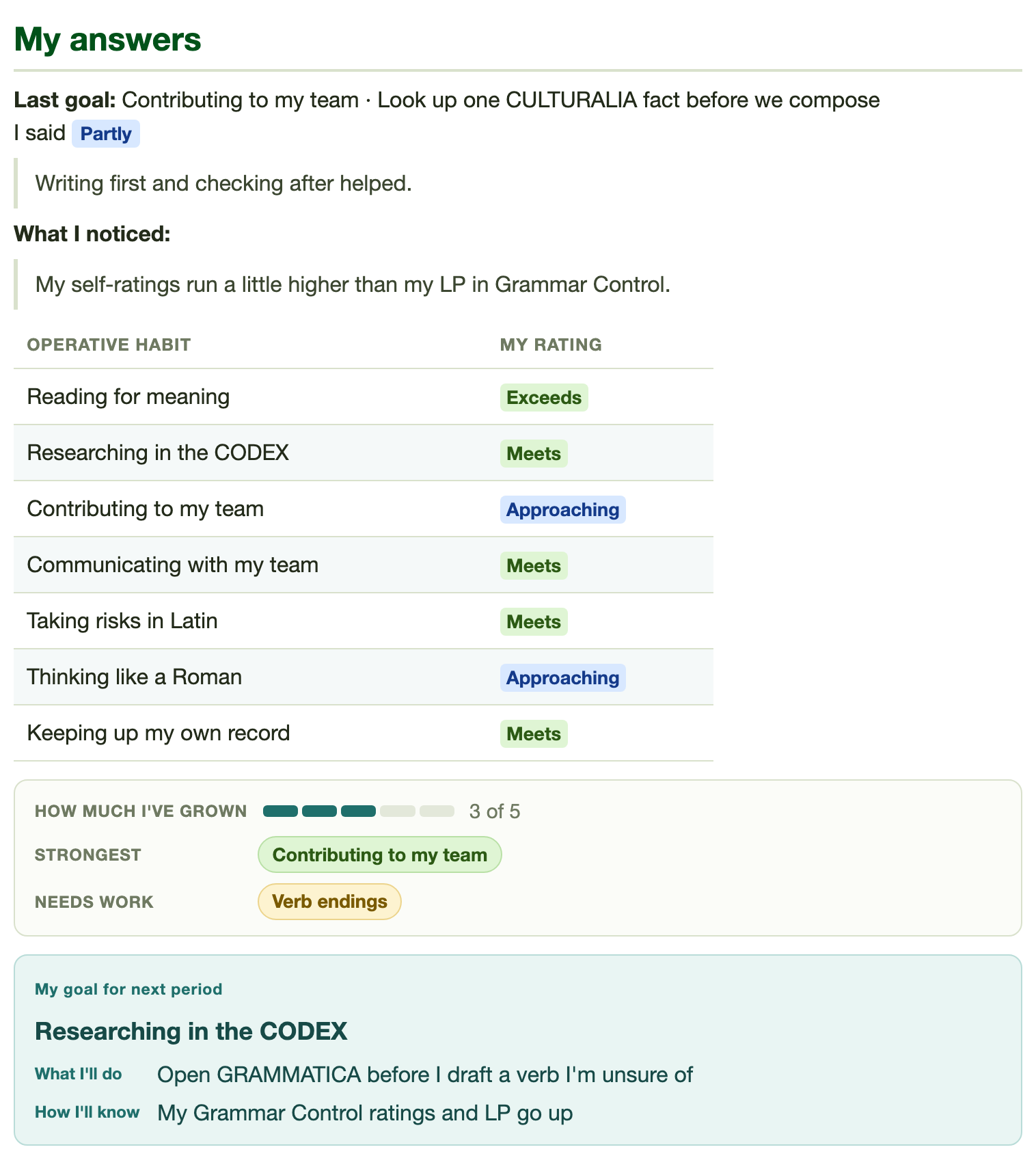
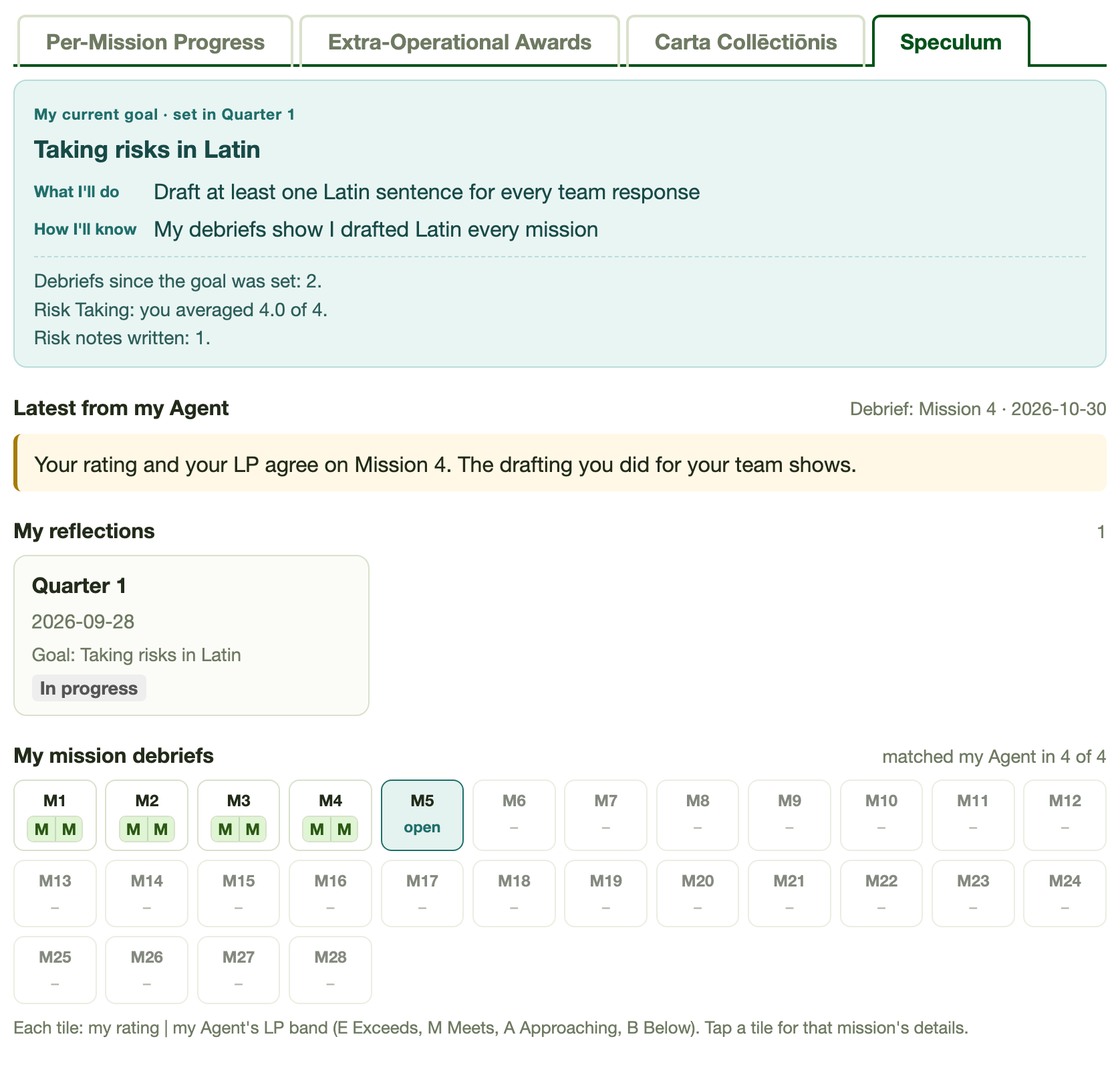
As with a debrief, a submitted reflection opens as a My answers summary. The goal shows as a heading naming the habit or work target, with What I'll do and How I'll know on lines of their own, and growth shows as a five-step meter with the strongest and needs-work picks as green and amber chips. The same goal heading follows the student onto their dossier and the Orders panel, so it reads as one commitment wherever they meet it.
Reading the reflections
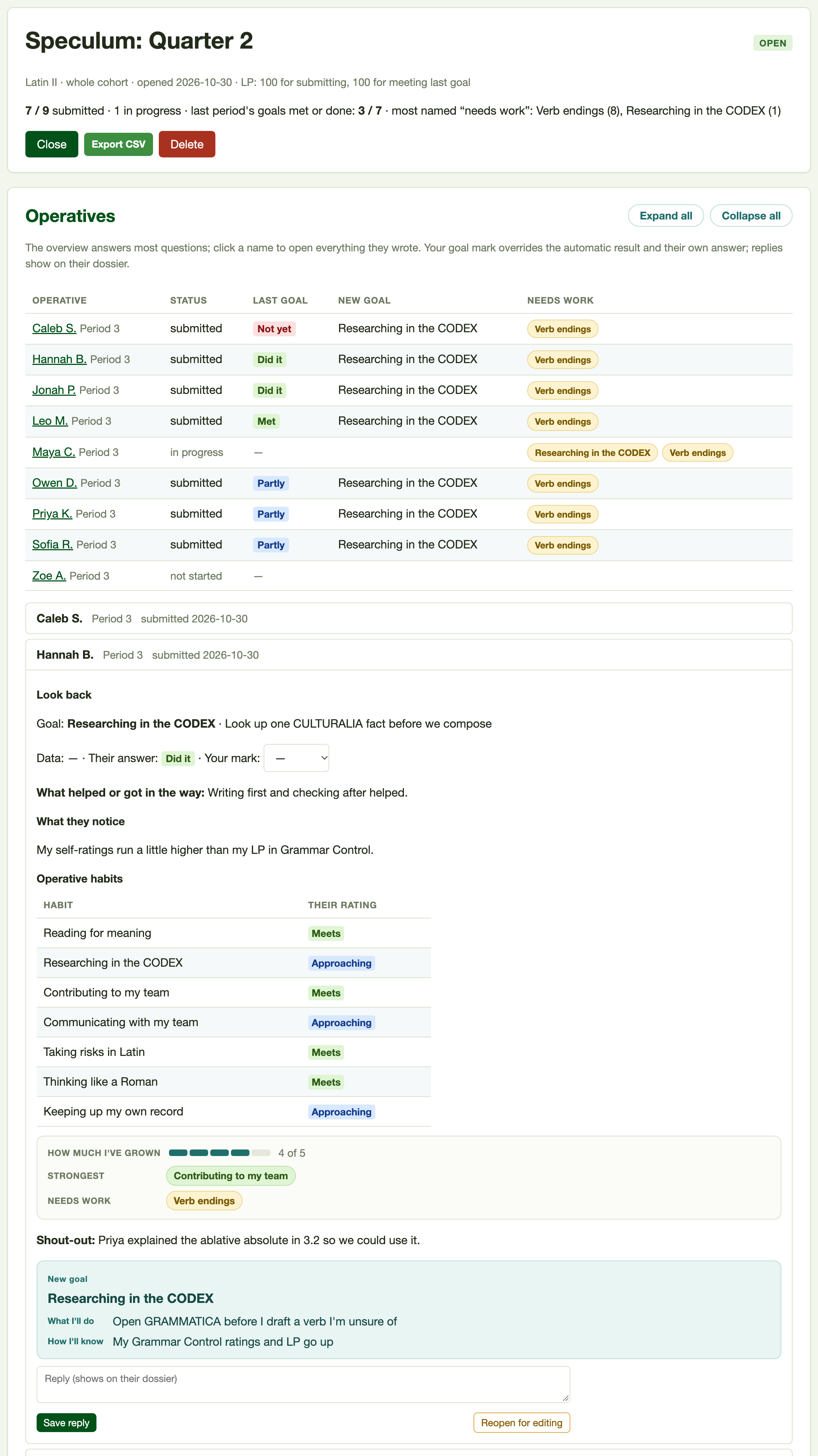
The reflection's page opens with an overview table, one row per operative: whether they have submitted, how last period's goal went (from the second reflection on), their new goal, and the areas they marked as needing work. Most questions are answered there. Click a name to open everything they wrote: the look-back (the data result, their answer and a menu for your mark), their habit ratings, the growth meter and chips, shout-out, new goal, and answers to your own prompts, ending in the same reply row as a debrief, with Save reply and Reopen for editing. Expand all and Collapse all open or close every operative at once. The header counts how many of last period's goals were met or done and names the areas most often marked as needing work, a quick guide to what the cohort wants retaught.
The Reflection Record
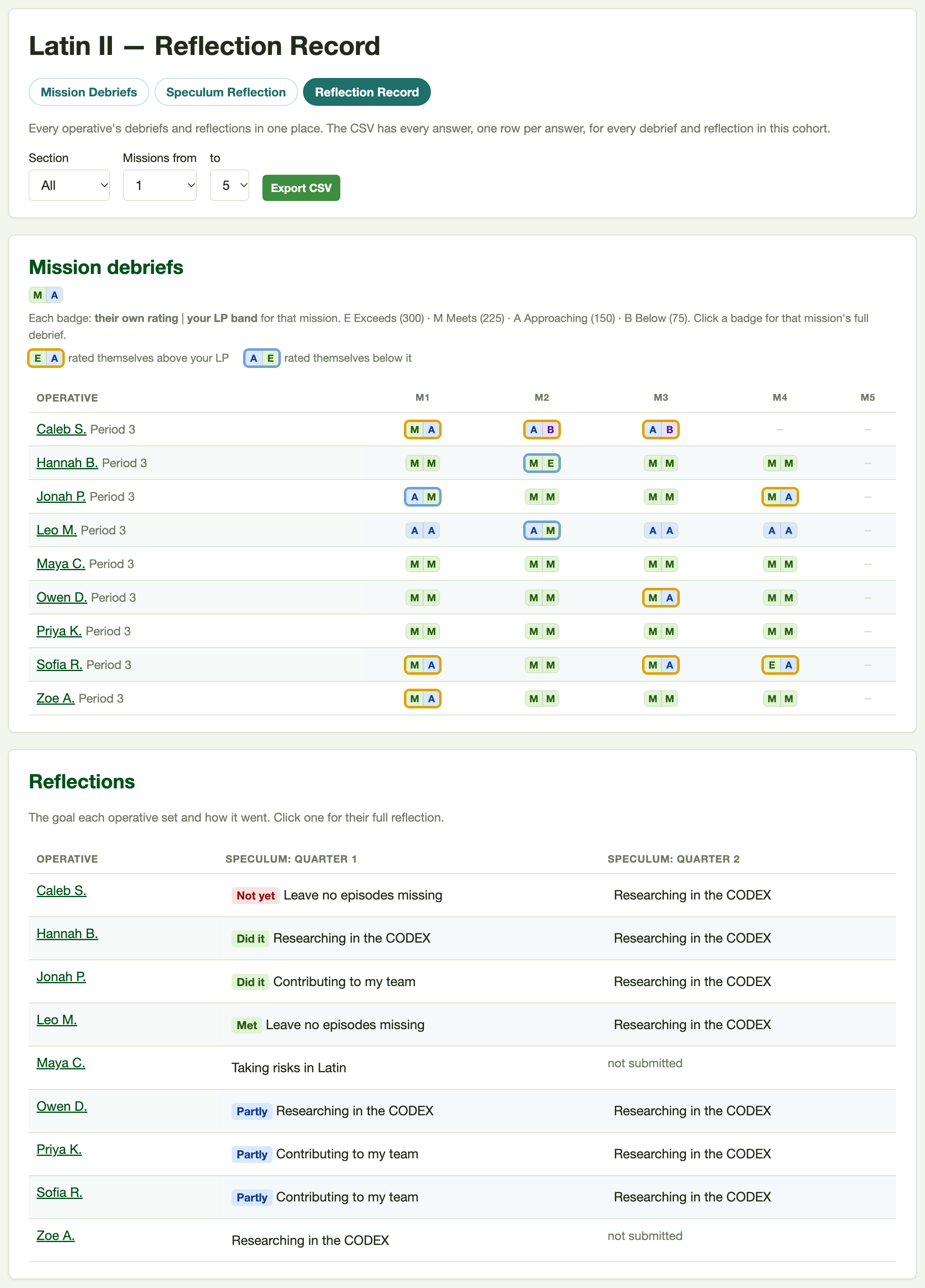
Review · Reflection Record puts the cohort on one page. The mission table gives each operative a split badge per mission: their own rating on the left and your LP band on the right, each as a letter on the LP colors (E Exceeds, M Meets, A Approaching, B Below). A badge is ringed when the two differ, amber when the operative rated themselves above your LP and blue when below, so the students who overrate or underrate their work stand out down a column without your reading every cell. Below it, the reflections table shows the goal each operative set each period and how it went. Filter by section or by a range of missions, or export a CSV of every answer, one row per answer.
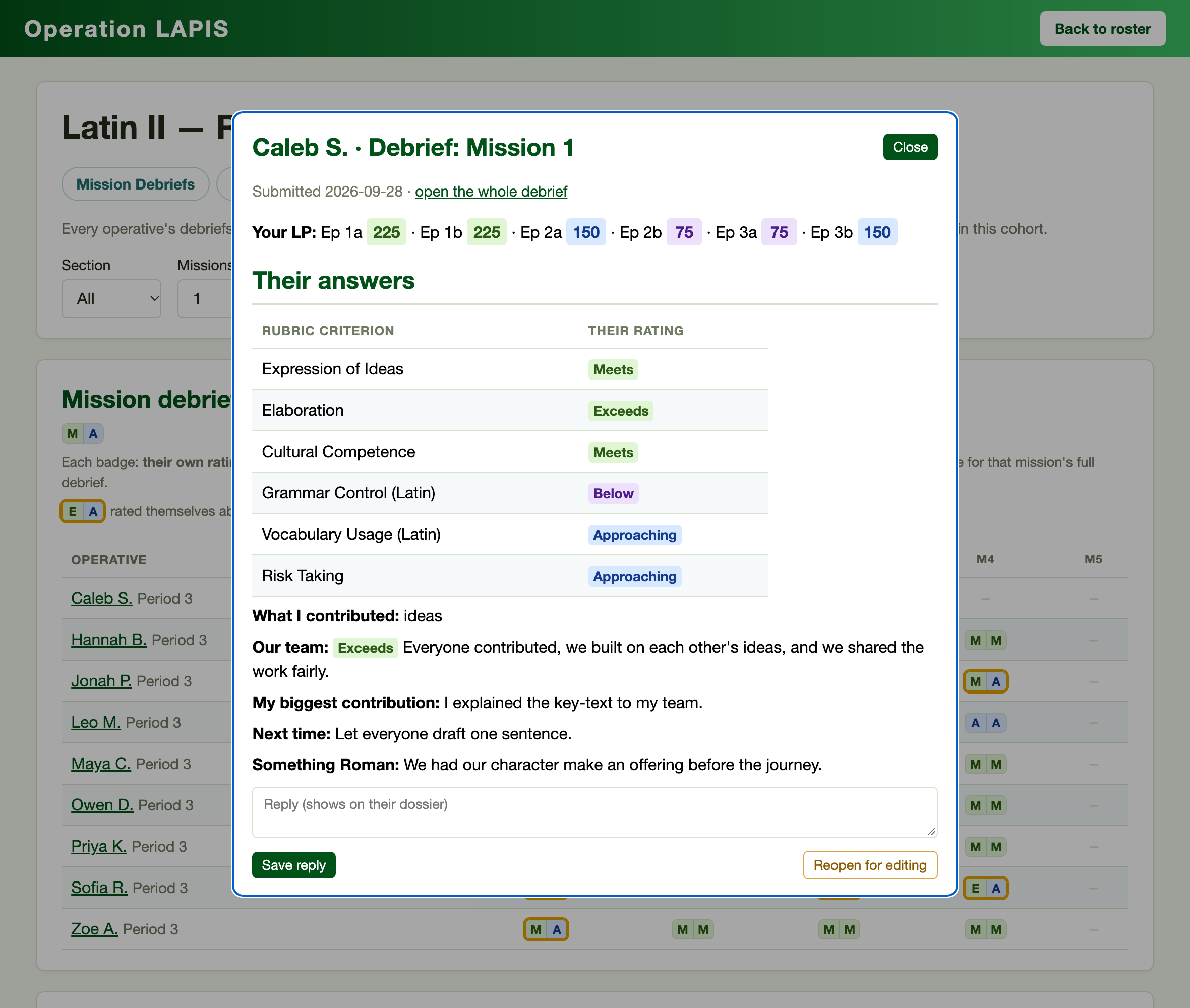
Every badge and every reflection cell opens that operative's entry in a pop-up with one click: their answers in brief, the mission's LP, and the same reply box and Reopen for editing as on the dashboard, plus your goal marks on a reflection. You can read and answer a whole cohort from the Record without leaving the page. The same pop-up opens from View on the Speculum tab of an operative's manage page, which lists every debrief and reflection open to that operative.
LP Is Optional
Speculum works without LP. If you want to reward it, set LP when you open a debrief or deploy a reflection: an amount for submitting and, on a reflection, an amount for meeting last period's goal, with half for "partly." The LP land in one Extra-Operational Award per debrief or reflection, paid when the operative submits. Like a Verba Trial's award it cannot be edited by hand, so the score always matches what the student did.
Closing, Reopening and Deleting
Close stops new answers while keeping any drafts, and the same button opens the debrief or reflection again. Reopen for editing on a single entry, from the dashboard, a Record pop-up or the operative's manage page, lets that operative edit after submitting, for a student who submitted in a rush or needs to correct something. Delete removes the debrief or reflection, every answer in it, and its award, with no undo.
The Student's Orders Panel
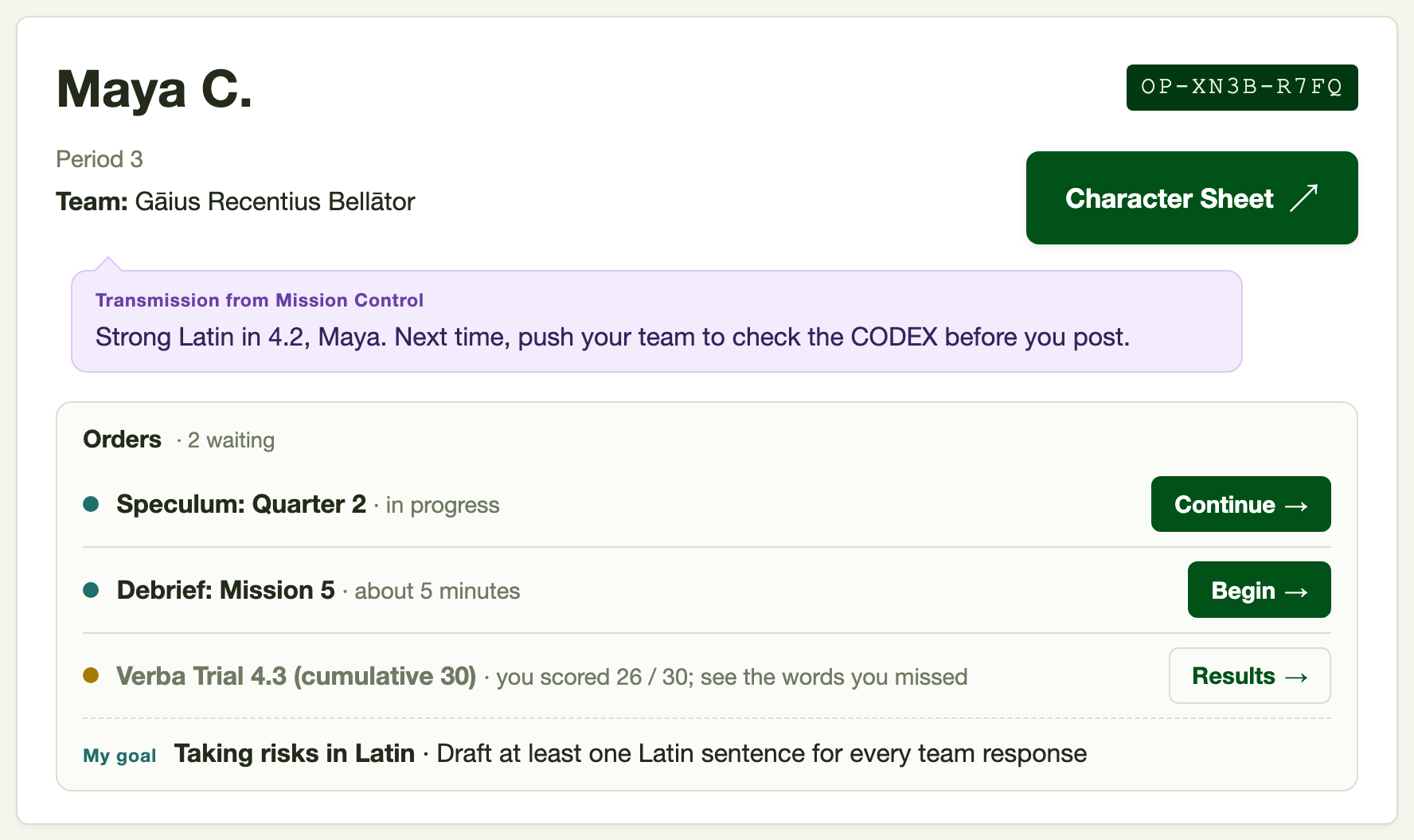
Everything Speculum asks of a student reaches them through the Orders panel near the top of their dossier. It lists whatever is waiting on them, one line each: an open debrief, an open reflection, an open Verba Trial, in-progress items first, each with a Begin or Continue button. Below those sits their latest Verba Trial result as a quieter row, and at the foot the goal from their last reflection as My goal, its heading and what they said they would do, so the goal is in front of them every time they open the dossier. Your Transmission appears just above the panel as a message bubble. When there is nothing to show, the panel disappears.
Once an operative has submitted a debrief or reflection, their dossier gains a Speculum tab. It opens with their current goal and how it is going, the live figure for a work goal or the evidence from debriefs since for a habit goal, so the goal is measured where they see it. Below that sit your latest reply, a card for each reflection with its goal and outcome, and a tile for every mission. A debriefed mission's tile carries the same split badge as the Reflection Record and opens the mission's details in a pop-up; a waiting debrief shows as an open tile that takes them to it. A line above the tiles says how often their rating matched your LP. The Per-Mission Progress tab also gains a Debrief column showing Debrief open while one is waiting, then the student's level beside your LP band, and each mission's Details drilldown includes its debrief.
Next: Carta Collēctiōnis